
Germany’s e-invoicing mandate
A PDF invoice does not satisfy the e-invoicing mandate.
From 1 January 2027, German businesses with more than €800,000 of prior-year turnover must issue structured e-invoices. ZUGFeRDig produces them to EN 16931 — as ZUGFeRD 2.3 and Factur-X 1.07, on your own PC.
- EN 16931 · ZUGFeRD 2.3 · Factur-X 1.07
- Your data stays on your PC
- Pay once, no subscription

The deadlines
The clock is already running.
Every German business has had to be able to receive e-invoices since January 2025. The obligation to issue them arrives in stages — and missing your date means issuing invoices that formally are not invoices.
Already in force
Everyone must be able to receive
Every German business must be able to receive and process e-invoices — small businesses included. This stage came with no transition period.
Issuing obligation above €800,000 prior-year turnover
Businesses with more than €800,000 of turnover in the previous year must issue structured e-invoices for domestic B2B trade. A PDF will no longer do.
Issuing obligation for everyone else
The issuing obligation extends to all remaining German B2B businesses, whatever their turnover.
Exceptions
- Small-value invoices up to €250 gross
- Invoices to private individuals (B2C)
- Certain supplies exempt under § 4 UStG
- Small businesses under § 19 UStG are permanently exempt from issuing — but not from receiving
Based on the Wachstumschancengesetz and § 14 UStG. This page is not tax or legal advice; confirm your own obligation with your tax adviser.
How it works
Two steps. No integration to build first.
Pick a customer, enter the lines, preview it, create the invoice — done. Add customers and products yourself, or import them from a .csv file.
ZUGFeRDig checks it
Three stages: well-formed XML, XSD schema, Schematron rules. Whatever is missing appears in plain language on screen, not as an error code.
PDF/A-3 with the XML inside
One file. Your customer sees the invoice as always; their accounting software reads the data straight out of it.
A look inside
This is what it looks like.
No rollout project, no training. One screen, where an invoice gets written.
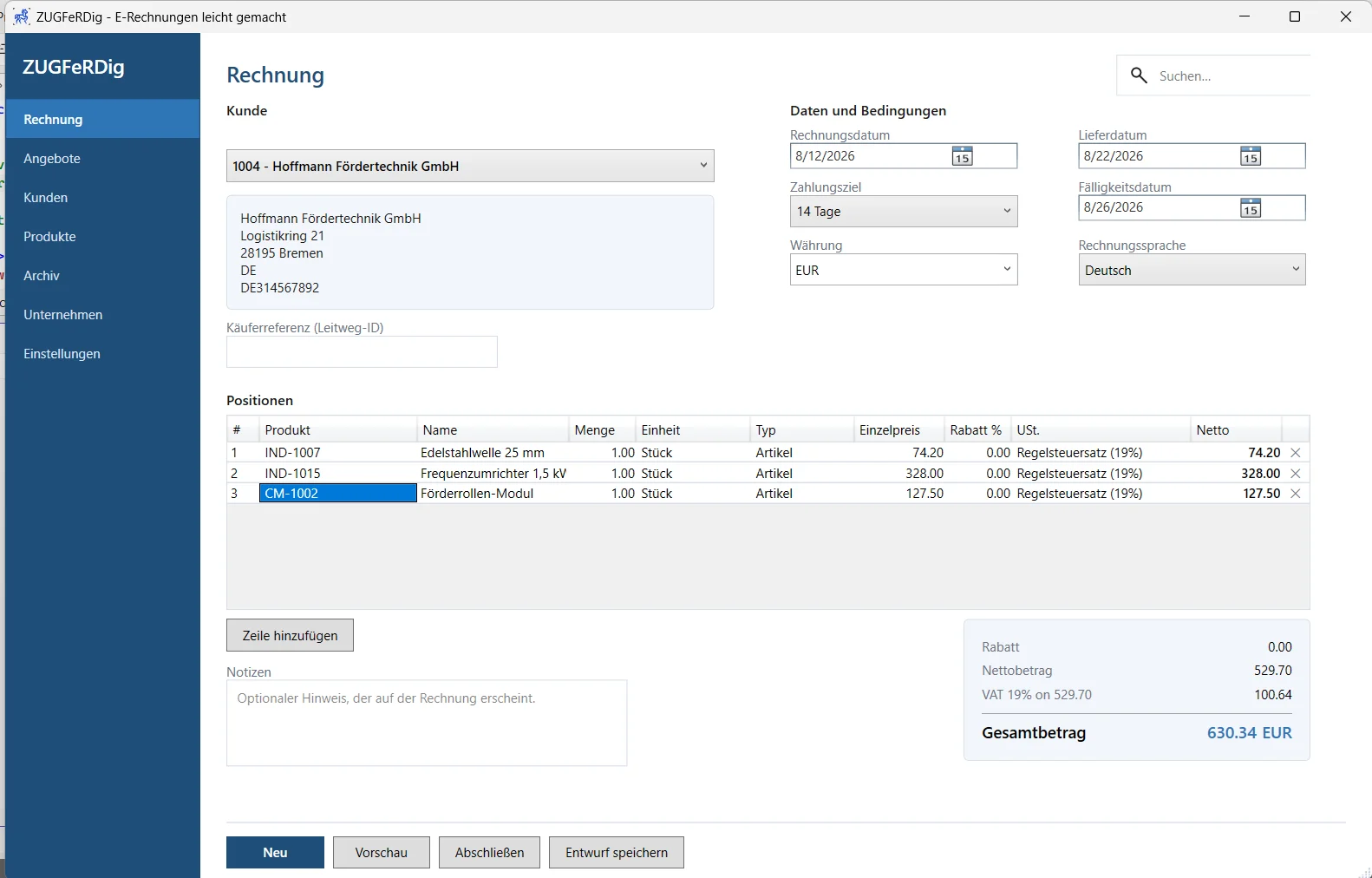
The invoice screen
Pick a customer, enter the lines, set the VAT treatment per line. Dates, currency and invoice language sit on the right; the totals add up as you go. The Leitweg-ID for public-sector invoices has its own field.
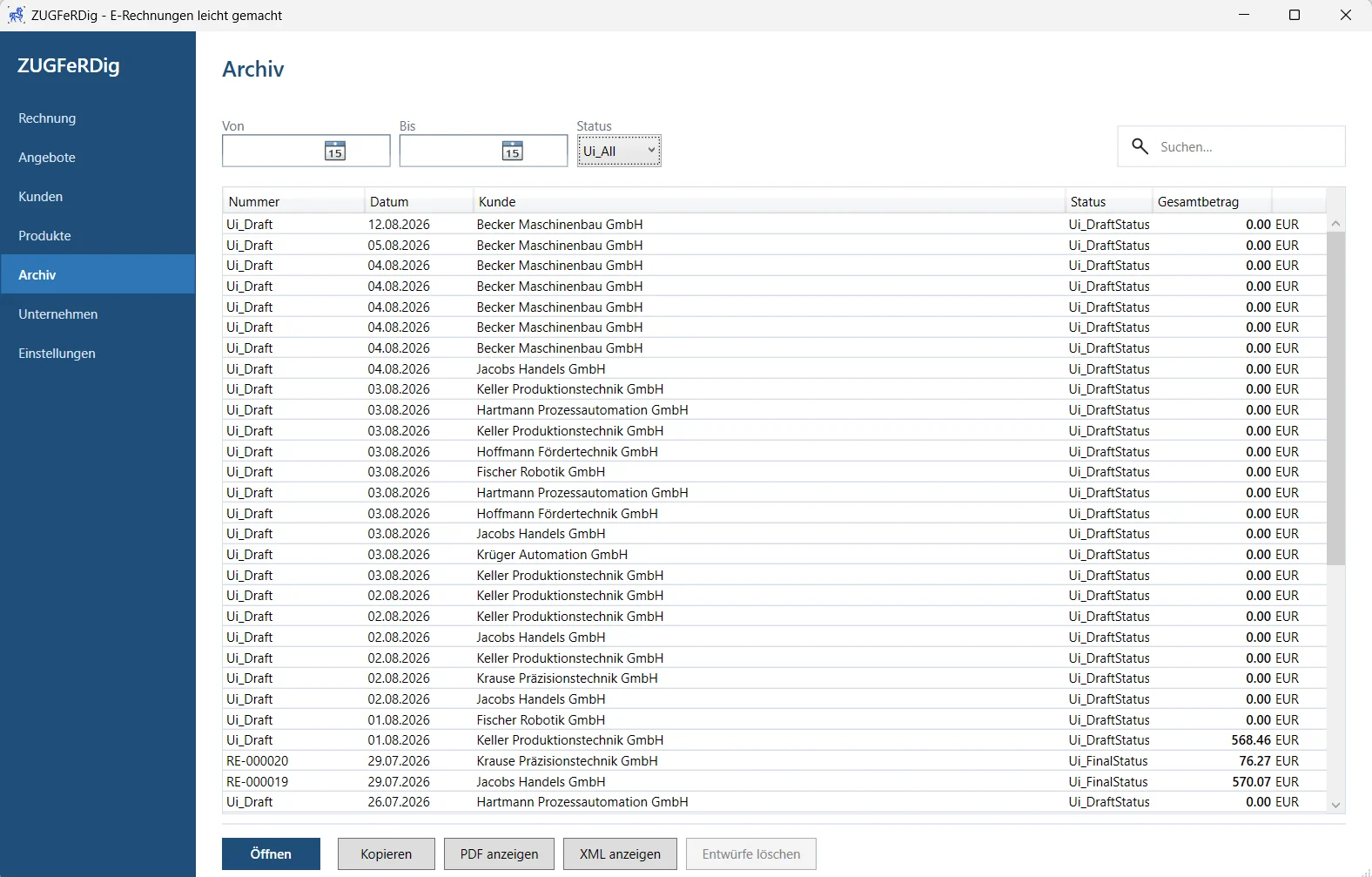
The archive
Every invoice with its number, date, customer and total — and for each one the PDF and the XML, opened separately. Drafts sit alongside and can be deleted. Finalised invoices cannot.
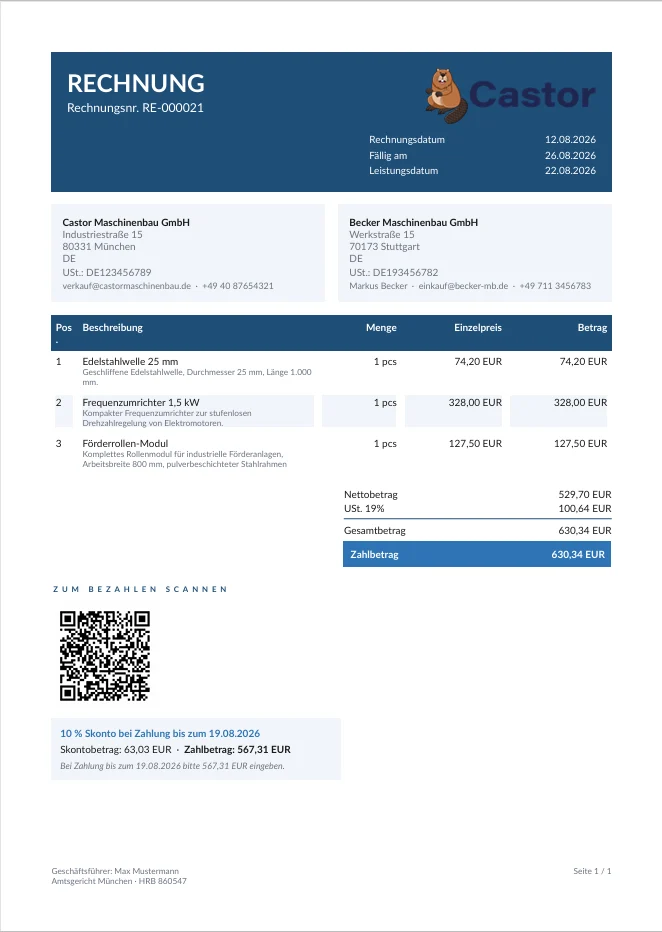
The result
Your logo, your footer with register and directors, your bank details. And inside the same file, the CII XML that your customer’s accounting system reads.
Features
What ZUGFeRDig does.
Built for small and mid-size German businesses that need a correct e-invoice, not an ERP project.
Standards-compliant e-invoices
Electronic invoices built on the European EN 16931 standard, with support for ZUGFeRD and Factur-X.
ZUGFeRD / Factur-X PDF/A-3
A normal, readable PDF invoice with the structured invoice XML embedded inside it for electronic processing.
XRechnung support
Invoices for customers and organisations that require the German XRechnung e-invoice format.
Built-in invoice validation
Invoice data and generated XML are checked against e-invoicing rules before finalising, catching missing or invalid information.
Professional PDF invoices
Clean, customer-ready PDFs with company details, logo, line items, VAT, totals, payment information and notes.
Customer management
Customer details, default currency, payment terms and e-invoicing preferences are saved and reused on future invoices.
Product and service catalogue
Frequently used products and services with descriptions, units, prices and VAT settings, for faster invoice entry.
Quotations
Create and save professional quotations, keep drafts for later editing, and finalise them as PDF documents.
Convert quotations to invoices
Turn an accepted quotation directly into an invoice without re-entering the customer, products or prices.
Invoice archive
Finalised invoices and drafts organised in one place, with options to reopen, copy and view the associated PDF or XML.
Copy existing invoices
Use an existing invoice as the starting point for a new one, reducing repetitive entry for similar invoices.
EPC / GiroCode payment QR code
A SEPA payment QR code on the invoice, so customers can scan the recipient, IBAN, amount and reference into their banking app.
Skonto / early-payment discounts
Define early-payment discounts per customer and show the discount and the reduced payable amount clearly on the invoice.
Flexible VAT handling
Standard VAT as well as the special treatments required for common German and EU invoicing scenarios.
German and English
Use the application interface and generate customer-facing invoice content in German or English.
Customisable invoice appearance
Add company branding and choose presentation settings while the underlying e-invoice data stays standards-compliant.
Optional product descriptions
Choose whether detailed product descriptions are printed on invoices and on quotations.
CSV customer import
Import customer master data from CSV instead of entering customers one by one.
Free for up to 10 invoices per month
Use the core invoicing functionality for up to 10 finalised invoices each month without purchasing a licence.
Simple Windows desktop application
Work locally in a focused desktop application, built for small businesses that need compliant invoicing without an ERP system.
Watch
The full walkthrough.
Set up the company, write the first invoice, check the result.
Data ownership
Your invoice data never leaves your PC.
That is not a setting you can toggle — ZUGFeRDig simply has no server to send anything to.
No account, no sign-in
Install it, open it, work. There is nothing to register.
One file, and it is yours
Your database sits in %AppData%\Roaming. Backing up means copying it; moving machine means taking it with you.
No data-processing agreement needed
Where no data reaches a third party, there is no processor to sign an agreement with.
Works without internet
Writing, validating, generating and archiving an invoice all work entirely offline.
Pricing
Pay once. Not every month.
Writing an invoice is not a service that gets re-delivered monthly. The price reflects that.
Free forever
Free edition
For everyone. No account, no trial period, no expiry.
Freepermanently, no time limit
- Up to 10 finalised invoices per month
- Every feature included, nothing held back
- The count resets at the start of each month
- Archive, preview and validation
The eleventh invoice in a month is where it stops and offers you a licence. Everything you have already written stays yours, and next month you have ten again.
Perpetual licence
ZUGFeRDig licence
For anyone who writes more than ten invoices in a month.
€299one-off, plus VAT
- Unlimited invoices
- Everything in the free edition, which is every feature
- A perpetual licence, not a subscription
- Updates to new ZUGFeRD versions
Price excludes VAT. The amount depends on your country and status and is determined at checkout: EU consumers are charged their own country’s rate; businesses with a valid VAT number are charged no VAT (reverse charge).
You can try ZUGFeRDig in full before buying.

Behind it
Who built this.
Kim Steffensen
Developer of ZUGFeRDig · Dr Dynamics
Kim Steffensen has worked with Microsoft Dynamics ERP systems for many years, including fifteen years at Microsoft supporting Dynamics AX and Dynamics 365 Finance & Operations. His focus for some years now has been electronic invoicing: ZUGFeRD, Factur-X, XRechnung and the European standard EN 16931.
ZUGFeRDig came out of that work. In a large ERP programme, e-invoicing is one module among many. A smaller business simply needs a correct invoice, but faces the same rules without an enterprise budget. ZUGFeRDig is the tool for that case: it produces a standards-conformant e-invoice and nothing else — but with the features you actually need, such as Skonto, QR code payment and quotations, which are usually only found in packages built for larger businesses.
Have a question about ZUGFeRDig? Send him a message — Kim answers questions about the software himself.
View profileCommon questions
What you are probably asking right now.
Is a PDF not an e-invoice?
No. An e-invoice under § 14 UStG has to be in a structured electronic format that a machine can process. A scanned or printed PDF is a picture of an invoice, not a structured record. ZUGFeRD solves that by putting both in one file: the visible PDF and the machine-readable XML.
What is the difference between ZUGFeRD, XRechnung and Factur-X?
All three satisfy the European standard EN 16931. XRechnung is XML only and is the usual format for German public-sector invoicing. ZUGFeRD is a PDF/A-3 with XML embedded, readable by people and machines at once. Factur-X is the same format under a French name. ZUGFeRDig writes ZUGFeRD 2.3, which is also Factur-X 1.07.
Does the mandate apply to me as a small business?
Partly. Small businesses under § 19 UStG are permanently exempt from having to issue e-invoices. They are not exempt from having to receive and process them — that has applied to everyone since 1 January 2025. ZUGFeRDig is free for up to ten invoices a month, which for most businesses in this position is the whole of it.
Where is my data stored?
On your machine, in a SQLite database inside your user profile under %AppData%\Roaming. There is no cloud storage and no user account. Back up that file and you have backed up your complete invoice history.
Do I need an internet connection?
Not to work. Writing, validating, generating a ZUGFeRD PDF and archiving it all work entirely offline.
Can I bring my customers and products across?
Yes, via CSV import for both. It reads standard CSV to RFC 4180, so quoted fields containing commas and doubled quotes are handled correctly.
Does ZUGFeRDig run on Mac or Linux?
No. ZUGFeRDig is a Windows application for Windows 10 and 11 (64-bit).
Can I hand the invoices to my accountant?
Yes. For every finalised invoice, the PDF/A-3 and the standalone CII XML are both in the archive and can be saved out individually.
What happens when the format changes?
ZUGFeRD continues to evolve; ZUGFeRDig currently writes version 2.3 at the EN 16931 profile, which newer releases accept as backward compatible. Licence holders receive the updates to new format versions.
Do not leave it until December.
Switching over takes an afternoon. The deadline does not move.
Contact
Questions?
Write directly — enquiries are answered by the person who built the software.
kim@drdynamics.co.uk